Flux Kontext Image Editor - Advanced Flux.1 Kontext AI
Experience our Flux Kontext Image Editor powered by Flux.1 Kontext AI. Our powerful AI tools include Flux.1 Kontext Pro and Flux.1 Kontext Max, delivering exceptional Text-to-Image and Image-to-Image capabilities.
Enter a description or click on the examples below to start creating
Examples from the Flux.1 Kontext Image Editor
Flux.1 Kontext Pro is a sophisticated image generation tool designed for creators, designers, and brand visual teams.
Edit Background and Clothing with Flux Kontext

Source Image

Change the background to a garden

Change the skirt to a white T-shirt
Restore Old Photos

Original

Restore photo details and add color
Edit Poster Content

Source Image
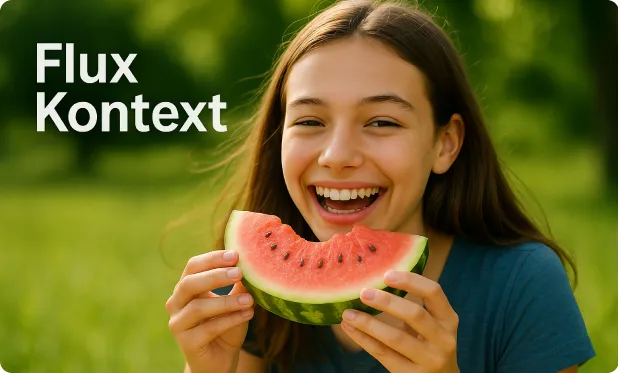
Change the text on the photo to "Flux Kontext" and keep the rest unchanged
Convert Between Photo and Anime Style

Source Image

Transform the image into a real photo
Core Features of Flux Kontext Image Editor
Flux Kontext Editor leverages advanced AI technology to transform text editing into an efficient and intelligent visual creation experience.
Semantic-Driven Editing
Our editor deeply understands language structure and semantic relationships, intelligently optimizing text logic, tone, and structure to make content more persuasive and coherent.
Character and Scene Consistency
Maintains consistency in character features, composition, and emotional tone across multiple images, enabling smooth visual storytelling.
Rich Styles with Adjustable Parameters
Supports free switching between multiple artistic styles, allowing users to fine-tune image details such as lighting effects, camera angles, and composition methods according to their needs for personalized customization.
Integrated Continuous Image Generation
Generate multiple related images through a single text prompt, suitable for content creation with strong narrative flow, such as graphic novels, story storyboards, or visual previews.
Core Advantages of Flux.1 Kontext Image Editor
Compared to traditional image generation tools, Flux Kontext Editor emphasizes semantic understanding and logical coherence between language and visuals, making the creative process more efficient and expressions more compelling.

Precise Contextual Recognition
Deeply analyzes logical structure and sentence relationships in text, driving generation with semantics at its core to ensure high alignment between image content and narrative.
Flexible Creative Control Options
Supports multiple parameter adjustments for easy customization of character appearance, emotional tone, compositional structure, and visual style to meet diverse creative needs.
Narrative Content Generation Support
Can generate multi-image visual content based on entire text passages, perfect for novel illustrations, storyboard scripts, and presentation slides.
Lower Creative Technical Barriers
No artistic background or complex operations required - simply input text to automatically generate high-quality images, enabling every creator to easily express their ideas.
Application Scenarios of Flux Kontext Editor
Flux Kontext Editor is a comprehensive visual content generation assistant, covering creative design, e-commerce marketing, education and training, product development, and film and entertainment industries, helping users create efficiently, optimize workflows, and enhance expression and communication effectiveness.

E-commerce and Marketing Visual Content
Support rapid generation of product display images to enhance visual appeal. Can also generate corresponding advertising images based on brand copy, maintaining consistent style.
Product Design and Prototype Development
Transform product concepts into visual prototypes, accelerating validation processes. Multiple rounds of text input enable quick design direction adjustments.
Creative Content Creation
Automatically generate illustrations based on text, perfectly suited for novels, scripts, and graphic novels.
Education and Training Visualization
Transform educational content into intuitive images to assist knowledge understanding.

How to Use the Flux Kontext Image Editor
Get your desired AI-generated image in just a few simple steps.